
Amazon EFS (Elastic File System) là gì? Kiến trúc triển khai EFS
📁 Amazon EFS (Elastic File System) là gì?
Amazon EFS là dịch vụ lưu trữ dạng file (file system) được quản lý hoàn toàn (fully-managed), có thể được gắn đồng thời vào nhiều EC2 instance, hoạt động giống như ổ đĩa mạng (NFS – Network File System).
🧠 1. Đặc điểm nổi bật của EFS
| Tính năng | Mô tả |
|---|---|
| Multi-AZ & HA | Tự động sao chép dữ liệu giữa nhiều AZ để đảm bảo độ bền |
| Shareable | Nhiều EC2 có thể mount cùng 1 EFS → dùng chung dữ liệu |
| Không giới hạn dung lượng | Tự động scale theo dung lượng sử dụng thực tế |
| Hỗ trợ NFSv4.1 | Mount như ổ mạng qua /mnt/efs |
| Mã hóa & phân quyền | Mã hóa at rest và in-transit, kiểm soát IAM & SG |
| Thích hợp cho container & Lambda | Có thể gắn vào ECS, EKS, Lambda... |
🧩 2. Ứng dụng thực tế của EFS
| Ứng dụng | Mô tả |
|---|---|
| Web Server (Apache/Nginx) | Chia sẻ nội dung web giữa nhiều EC2 (hoặc autoscaling) |
| Ứng dụng phân tán (clustered apps) | Chia sẻ file cấu hình, module giữa các node |
| Shared home directories | Giống như ~/.ssh, ~/.bashrc dùng chung giữa user/instance |
| Backup đồng bộ | Dùng EFS để lưu logs, snapshot định kỳ từ nhiều hệ thống |
| Containerized workload | ECS task hoặc Lambda có thể mount EFS để lưu file tạm |
| Data Lake hoặc AI/ML | Lưu datasets lớn cần truy cập đồng thời từ nhiều job |
🛠️ 3. So sánh EBS vs EFS vs S3
| Tiêu chí | EBS | EFS | S3 |
|---|---|---|---|
| Loại lưu trữ | Block | File | Object |
| Gắn vào | 1 EC2 | Nhiều EC2 | Không gắn (API truy cập) |
| Sử dụng | DB, logs, hệ điều hành | Chia sẻ file, cấu hình, web | Backup, static website, app assets |
| Dung lượng | Đặt trước (tăng thủ công) | Tự scale | Tự scale |
| Performance | Cao (IOPS cao) | Tốt (NFS v4.1) | Phù hợp content lớn (image, video) |
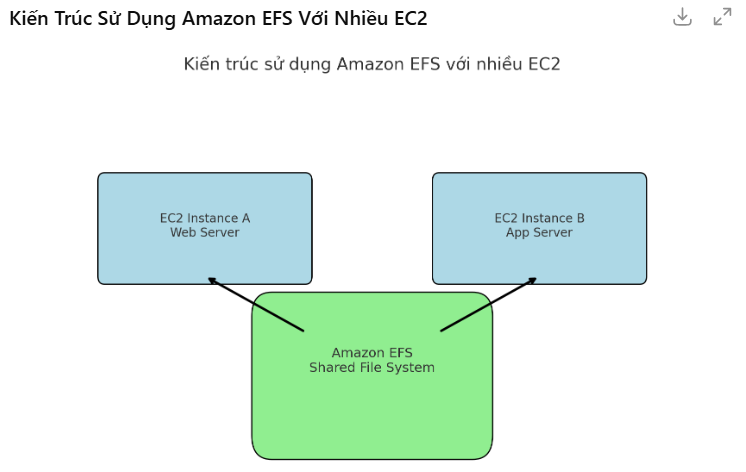
🏗️ 4. Kiến trúc triển khai EFS
           +------------------+
           |   EC2 Instance A |
           |  mount /mnt/efs  |
           +------------------+
                   |
           +------------------+
           |   Amazon EFS     |  ← Hệ thống file dùng chung
           +------------------+
                   |
           +------------------+
           |   EC2 Instance B |
           |  mount /mnt/efs  |
           +------------------+
💡 Gợi ý triển khai
-
Tạo EFS → chọn VPC/Subnet/AZ
-
Tạo mount target ở mỗi AZ dùng
-
Gán đúng Security Group (cho phép NFS TCP port 2049)
-
Trên EC2:
sudo apt install -y nfs-common
sudo mkdir /mnt/efs
sudo mount -t nfs4 -o nfsvers=4.1 <efs_dns>:/ /mnt/efs
Dưới đây là file CloudFormation Template YAML hoàn chỉnh để:
✅ Tạo EFS
✅ Tạo EC2 (Ubuntu)
✅ Mount EFS vào/mnt/efstrên EC2 thông quaUserData
✅ Mở port NFS (2049) trong Security Group
📄 Template:
efs-with-ec2.yamlAWSTemplateFormatVersion: '2010-09-09' Description: EC2 instance with EFS mount Parameters: KeyName: Type: AWS::EC2::KeyPair::KeyName Description: EC2 Key Pair for SSH Resources: MyVPC: Type: AWS::EC2::VPC Properties: CidrBlock: 10.0.0.0/16 EnableDnsSupport: true EnableDnsHostnames: true Tags: - Key: Name Value: EFS-VPC PublicSubnet: Type: AWS::EC2::Subnet Properties: VpcId: !Ref MyVPC CidrBlock: 10.0.1.0/24 MapPublicIpOnLaunch: true AvailabilityZone: !Select [ 0, !GetAZs '' ] Tags: - Key: Name Value: PublicSubnet InternetGateway: Type: AWS::EC2::InternetGateway AttachGateway: Type: AWS::EC2::VPCGatewayAttachment Properties: VpcId: !Ref MyVPC InternetGatewayId: !Ref InternetGateway PublicRouteTable: Type: AWS::EC2::RouteTable Properties: VpcId: !Ref MyVPC PublicRoute: Type: AWS::EC2::Route DependsOn: AttachGateway Properties: RouteTableId: !Ref PublicRouteTable DestinationCidrBlock: 0.0.0.0/0 GatewayId: !Ref InternetGateway RouteTableAssociation: Type: AWS::EC2::SubnetRouteTableAssociation Properties: SubnetId: !Ref PublicSubnet RouteTableId: !Ref PublicRouteTable EFSSecurityGroup: Type: AWS::EC2::SecurityGroup Properties: GroupDescription: Enable SSH and NFS VpcId: !Ref MyVPC SecurityGroupIngress: - IpProtocol: tcp FromPort: 22 ToPort: 22 CidrIp: 0.0.0.0/0 - IpProtocol: tcp FromPort: 2049 ToPort: 2049 CidrIp: 0.0.0.0/0 MyEFS: Type: AWS::EFS::FileSystem Properties: Encrypted: true PerformanceMode: generalPurpose FileSystemTags: - Key: Name Value: MyEFS EFSMountTarget: Type: AWS::EFS::MountTarget Properties: FileSystemId: !Ref MyEFS SubnetId: !Ref PublicSubnet SecurityGroups: - !Ref EFSSecurityGroup MyEC2Instance: Type: AWS::EC2::Instance Properties: InstanceType: t2.micro KeyName: !Ref KeyName ImageId: ami-0c55b159cbfafe1f0 # Ubuntu 22.04 for us-east-1 SubnetId: !Ref PublicSubnet SecurityGroupIds: - !Ref EFSSecurityGroup UserData: Fn::Base64: !Sub | #!/bin/bash apt update -y apt install -y nfs-common mkdir -p /mnt/efs mount -t nfs4 -o nfsvers=4.1 ${MyEFS}.efs.${AWS::Region}.amazonaws.com:/ /mnt/efs Outputs: EC2PublicIP: Value: !GetAtt MyEC2Instance.PublicIp Description: Public IP to SSH into EC2 EFSDNS: Value: !Sub "${MyEFS}.efs.${AWS::Region}.amazonaws.com" Description: DNS name for mounting EFS
🚀 Triển khai thực tế
-
Lưu nội dung vào file
efs-with-ec2.yaml -
Vào AWS Console → CloudFormation → Create Stack
-
Chọn file → Nhập KeyPair → Deploy
-
Bạn muốn mình mở rộng template này thêm Auto Scaling Group hoặc dùng với Lambda mount EFS không?
-
Sau khi xong:
-
SSH vào EC2
-
Kiểm tra mount EFS:
df -h | grep /mnt/efs
-
Bạn muốn mình tạo file CloudFormation để tự động tạo EFS + EC2 + mount đầy đủ không?