
Creating new Python evironment
Setting up the environment and exploring the packages (text article)
1. Creating new Python evironment.
A virtual environment is like a separate workspace for Python. It has its own Python version and its own set of installed packages. This way:
-
You can install the exact versions needed for the course.
-
You won’t break any other Python projects on your computer.
We’ll create and manage this environment with conda - a package and environment manager.
Open the Anaconda/Miniconda Prompt (Windows) or Terminal (macOS/Linux) and execute the commands below:
conda create --name nlp_course_env python=3.11
conda activate nlp_course_env
When activated, you’ll see (nlp_course_env) appear before the command line.
2. Installing the relevant packages.
To install the required packages into the new environment, we'll use pip - Python’s built-in package installer. Think of conda as setting up the room (environment), and pip as bringing in the furniture (the libraries).
We use pip here because some packages are easiest to install from PyPI.
In Anaconda Prompt or Terminal, execute:
pip install "numpy<2.0" nltk==3.9.1 pandas==2.2.3 matplotlib==3.10.0 spacy==3.8.3 textblob==0.18.0.post0 vaderSentiment==3.3.2 transformers==4.47.1 scikit-learn==1.6.0 gensim==4.3.3 seaborn==0.13.2 torch==2.5.1 ipywidgets==8.1.5 chardet ipykernel jupyterlab notebook
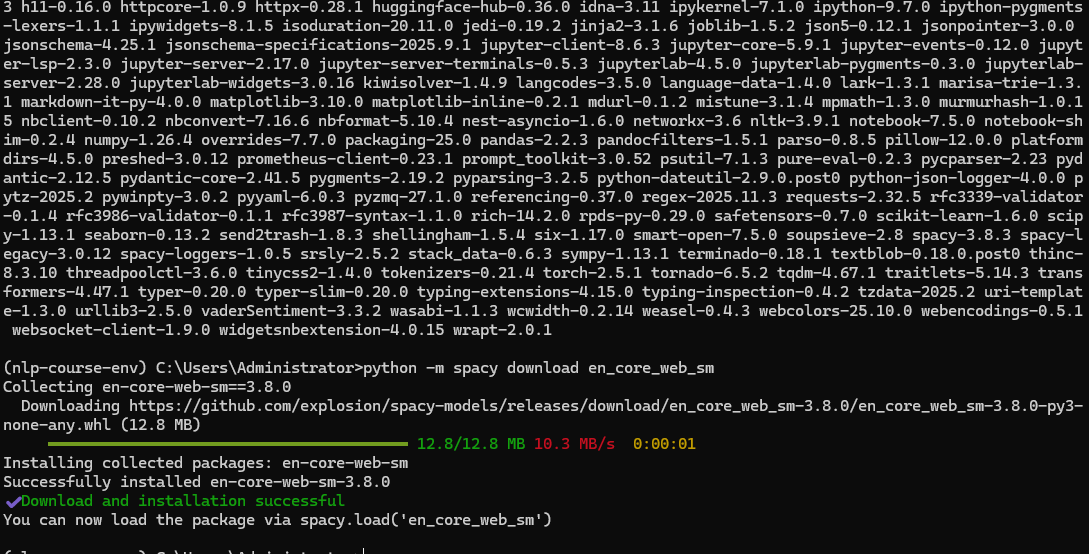
Next, download the spaCy language model:
python -m spacy download en_core_web_sm
And register the new environment as a Jupyter kernel:
python -m ipykernel install --user --name=nlp_course_env
Then, open Anaconda Navigator and remember to set the environment to "nlp_course_env". Launch Jupyter Notebok and check the kernel is also set to "nlp_course_env".

********************************************************************************************************
3. Explaining the packages.
Let's now breakdown what each library is used for:
-
nltk (3.9.1) – The Natural Language Toolkit, one of the oldest and most widely used NLP libraries. It includes tools for breaking text into words or sentences (tokenizers), simplifying words to their base form (stemmers, lemmatizers), and accessing large text collections and linguistic datasets. Great for learning and experimenting with NLP basics.
-
pandas (2.2.3) – Provides the DataFrame structure, which makes it easy to load, clean, and organize data in rows and columns (similar to Excel, but much more powerful). You’ll use it to manipulate text datasets and combine them with other information.
-
matplotlib (3.10.0) – The fundamental Python plotting library. It lets you create line charts, bar graphs, scatter plots, and more. Think of it as the "drawing canvas" for your data visualizations.
-
seaborn (0.13.2) – Built on top of matplotlib, but with easier functions and beautiful default styles. It’s especially good for statistical plots, like showing correlations between variables or distributions of data.
-
scikit-learn (1.6.0) – A general-purpose machine learning toolkit. It provides algorithms for classification, regression, clustering, feature extraction, and model evaluation. It’s often used for building traditional ML models before moving on to deep learning.
-
spaCy (3.8.3) – A modern NLP library designed for speed and production use. It handles advanced tasks like part-of-speech tagging (identifying nouns/verbs), named entity recognition (detecting people, places, organizations), and syntactic parsing. It’s faster and more practical than NLTK for large-scale projects.
-
TextBlob (0.18.0.post0) – A beginner-friendly NLP library that wraps around NLTK and other tools. It makes common tasks like sentiment analysis, phrase extraction, and translation very simple with just a few lines of code.
-
VADER Sentiment (3.3.2) – A lightweight, rule-based tool for sentiment analysis, tuned for short, casual texts like tweets, reviews, and comments. It understands things like exclamation marks, capitalization, and even emoji sentiment.
-
gensim (4.3.3) – A library for topic modeling and working with word embeddings. It’s known for algorithms like Word2Vec (which learns word meanings from context) and LDA (Latent Dirichlet Allocation) for discovering hidden topics in large text collections.
-
transformers (4.47.1) – From Hugging Face, this is the go-to library for using state-of-the-art NLP models like BERT, GPT, and other large language models. It makes it easy to load pretrained models for tasks like classification, text generation, and translation.
-
PyTorch (torch 2.5.1) – A deep learning framework that powers libraries like
transformers. It’s used to build and train custom neural networks for NLP and beyond. Many cutting-edge AI models are implemented in PyTorch. -
ipywidgets (8.1.5) – Provides interactive controls (like sliders, dropdowns, and buttons) inside Jupyter notebooks. These let you build small UIs that make experiments more visual and hands-on.
-
NumPy <(2.0.0) – The foundational library for numerical computing in Python. It introduces the powerful
ndarrayobject, which lets you store and process large arrays and matrices of numbers efficiently. NumPy is behind almost every data science or machine learning library — it provides the fast, vectorized math operations that make Python suitable for heavy computations. You’ll use it for tasks like matrix operations, statistical calculations, and data transformations that feed into models or visualizations.